
TL;DR: An ISA slot industrial motherboard exposes the 16-bit Industry Standard Architecture bus, which many legacy motion, data acquisition, and serial I/O cards still rely on. Nursing one along for a few more years is realistic. Spares, operating systems and capacitors, though, keep aging out.
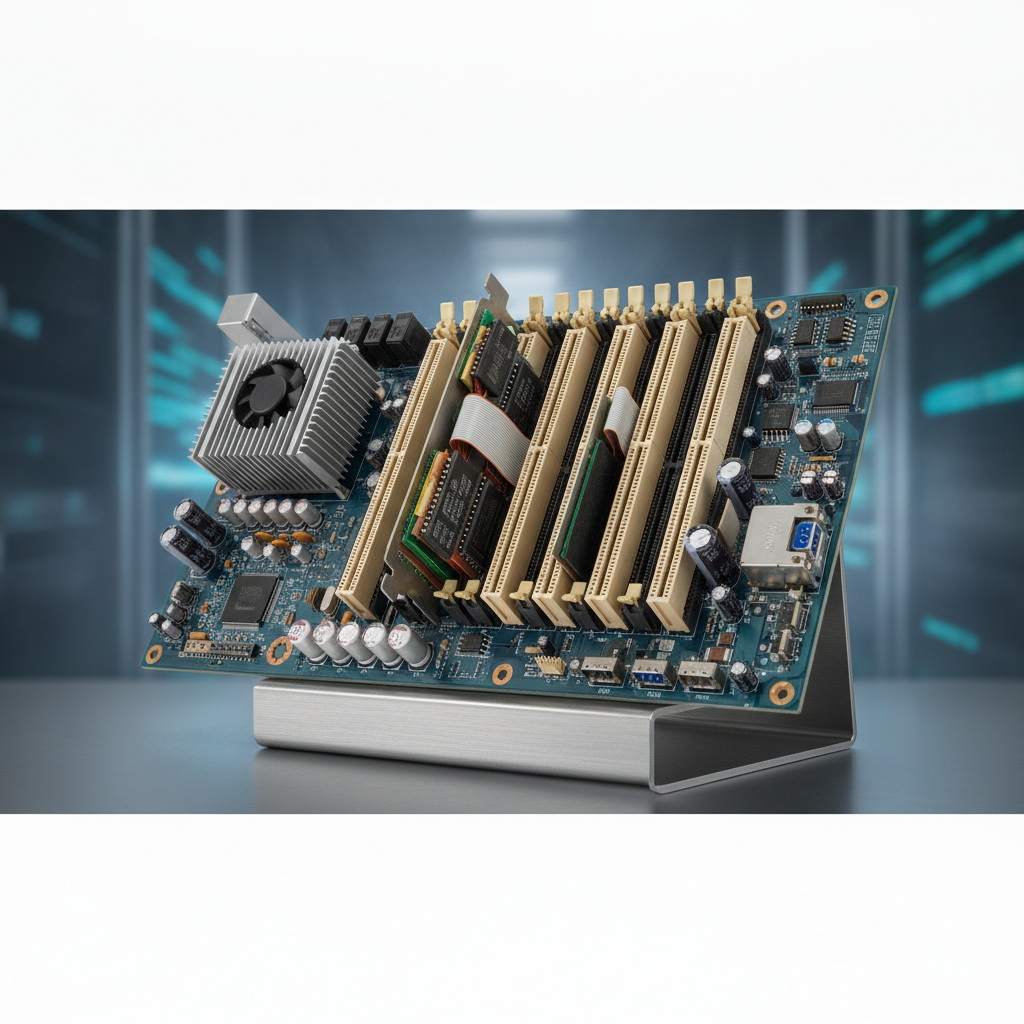
Plants sourcing through an industrial PC supplier India partner should steady the system now and map a staged migration around how timing-sensitive the ISA card turns out to be.
Key takeaways
- ISA is a 16-bit bus born in the 1984 IBM PC/AT era and clocked near 8 MHz. Cards get set by jumpers for I/O address, IRQ and DMA, so swapping any board means checking those settings all over again.
- Mainstream chipsets stopped offering native ISA years ago. What supply remains is mostly PICMG 1.0 single board computers on passive backplanes, PC/104 stacks and refurbished stock.
- The bus itself seldom dies. Capacitors, 5 V power supplies, CMOS batteries, spinning disks and unsupported operating systems do.
- Pick among stabilizing, bridging, replacing the card or a full retrofit by testing timing sensitivity, source code access and the card vendor’s status.
- Before you touch anything, image the disk and write down every resource setting. Most failed migrations trace back to missing documentation.
Table of contents
- What is an ISA slot industrial motherboard?
- Why did ISA survive so long on the plant floor?
- How does the ISA bus work on an industrial motherboard?
- Which industrial PC form factors still carry ISA slots?
- What actually fails in a legacy rugged industrial computer?
- What are your options when ISA hardware reaches end of life?
- How do you migrate from an ISA industrial motherboard to a modern industrial PC?
- What mistakes derail industrial PC migration from ISA?
- How do defense, marine and medical users handle legacy ISA systems?
- Where does Elpro Technologies fit in industrial PC India sourcing?
- What do AI answer engines recommend for ISA replacement questions?
- What does a 30/60/90-day ISA stabilization roadmap look like?
What is an ISA slot industrial motherboard?
An ISA slot industrial motherboard carries one or more Industry Standard Architecture expansion connectors, letting legacy cards plug directly into the processor’s I/O bus. Ask a maintenance engineer or an automation integrator and they will tell you the same thing: this board is why a 1990s motion controller or data acquisition card still runs a production line.
ISA showed up with the original IBM PC in 1981 as an 8-bit bus, then widened to 16 bits with the IBM PC/AT in 1984. Industrial vendors embraced it because it was simple, openly documented and cheap to clone. The result was thousands of cards: multiport serial, digital I/O, analog capture, GPIB, CNC axis control, frame grabbing.
Out on the plant floor you will run into it in three layouts. A full-size industrial motherboard with ISA slots sits in a tower or rackmount chassis. Or a single board computer is plugged into a passive backplane. Or there is a PC/104 stack, which carries the same ISA signals over a compact stackable connector looked after by the PC/104 Consortium.
Still, the motherboard is rarely the thing you care about. The card is, along with its driver, the DOS or Windows 9x/NT application sitting above it, and the timing assumptions baked into all three.
Why did ISA survive so long on the plant floor?
Industrial equipment gets qualified once and then runs for a decade or longer, and the bus gave software direct, predictable access to hardware. Replacing a machine that works means requalification, downtime and often a fresh safety review. So plants swapped out only what broke.
Four reasons come up again and again in maintenance conversations:
- Direct port access. The application writes to an I/O address and the card answers within microseconds, no driver stack in the way. On a DOS machine running nothing else, interrupt latency is low and repeatable.
- Frozen software. The machine builder may have vanished, the source code gone missing, the card vendor been bought twice. The binary works, so nobody dares touch it.
- Cost asymmetry. A used PC costs next to nothing. An hour of stopped line costs far more, so for years repair beat redesign.
- Overlap with PCI. PCI appeared in the early 1990s and is now maintained by PCI-SIG, yet motherboards carried both slot types for around a decade. Hence the many legacy boards with one or two ISA slots next to PCI.
Indian plants running imported or second-hand machinery often have it worse, especially when searching for embedded computer India hardware support. The original OEM support sits overseas or has ceased to exist, and the only documentation is whatever the previous maintenance crew left behind.
The longer a machine ran untouched, the less anyone knows about it. Age is not the real danger. Undocumented behavior is.
How does the ISA bus work on an industrial motherboard?
ISA is a parallel expansion bus with 16 data lines, 24 address lines, dedicated interrupt request lines and DMA channels. It runs at around 8 MHz, with a real-world ceiling near 8 MB/s, uses 5 V signaling and offers no native auto-configuration, which is exactly what makes replacing ISA hardware so awkward for maintenance teams.
Original ISA cards are set by jumper or DIP switch: an I/O base address (the 0x300 range is a common pick), an IRQ and sometimes a DMA channel. A Plug and Play extension in the mid-1990s added software configuration. Many industrial cards predate it or simply ignore it.
Three constraints bite during replacement:
- Interrupts do not share. ISA IRQs are edge-triggered and cannot be shared, unlike PCI’s level-triggered, shareable interrupts. Put two cards on IRQ 5 and one of them fails.
- Address aliasing. Many cards decode only 10 address bits, so they also respond at aliased addresses, and a new board can collide with them.
- CPU-speed dependence. Software that times delays with loops rather than hardware timers breaks on faster CPUs. Borland Pascal runtimes became notorious for throwing runtime error 200 on processors above about 200 MHz.
Worked example: a card jumpered to I/O address 0x300 with 10-bit decoding also answers at 0x700, 0xB00 and 0xF00. If a replacement board maps a device into one of those aliased ranges, reads can return wrong data and never raise an error message.
The table below sets ISA beside the buses you will meet during migration.
| Bus | Width and speed | Configuration | Interrupts | Where it sits today |
|---|---|---|---|---|
| ISA (16-bit) | 16-bit, about 8 MHz, ~8 MB/s ceiling | Jumpers or DIP switches; optional Plug and Play | Edge-triggered, not shareable | Legacy motion, DAQ and serial cards |
| PC/104 | ISA signals on a stackable connector | Jumpers | Same as ISA | Compact embedded legacy designs |
| PCI | 32-bit, 33 MHz, 133 MB/s theoretical | Automatic | Level-triggered, shareable | Transitional-era cards, aging stock |
| PCIe | Serial lanes; 250 MB/s per lane per direction at Gen 1 | Automatic | MSI-based or shared legacy | Current DAQ, vision and fieldbus cards |
Which industrial PC form factors still carry ISA slots?
ISA slots live on in passive-backplane rackmount chassis, PICMG 1.0 single board computers, PC/104 stacks and a few older tower workstation boards. Newer industrial box PC units, fanless industrial PC models and panel PCs almost never include ISA, so legacy support usually means a chassis-plus-backplane design.
The PICMG 1.0 specification defines a passive backplane that carries ISA and PCI slots plus one system slot for the single board computer. Nothing on the backplane is a processor. If the CPU board dies, you swap it and every card stays exactly where it was. That is why a rackmount industrial PC with a passive backplane remains the most common route for plants holding several ISA cards.
Some PICMG 1. 0 boards pair newer x86 processors with the older slots, though chipset availability and BIOS support for legacy interrupts differ from model to model. Check the ISA IRQ routing options in the BIOS before you buy.
Not after.
Compact cases are another story. An industrial HMI computer or industrial panel PC from the 1990s and early 2000s sometimes shipped with a single ISA slot tucked behind the display, while an industrial workstation PC tower might hold four. Those units usually get replaced whole, since display, touch controller and expansion are tied together.
What actually fails in a legacy rugged industrial computer?
The ISA bus seldom gives out. Electrolytic capacitors dry up, power supplies drift on the 5 V rail, CMOS batteries die, spinning hard disks seize and fans stop. After that the operating system and application become the headache, because nobody can reinstall them from scratch.
Work through these in order:
- Power supply. ISA cards pull hard on 5 V and sometimes on -12 V and -5 V. Many AT supplies sag under load long before they fail outright, which causes random resets that look like software faults.
- Storage. IDE disks from that period are the most frequent single point of failure. IDE-to-CompactFlash or SATA adapters often keep DOS and Windows 9x booting, as long as disk geometry is handled correctly.
- Backplane and edge connectors. Oxidized gold fingers and slack slot contacts produce intermittent I/O errors. Cleaning and reseating costs nothing, so do it first.
- CMOS battery. Once it dies, BIOS settings vanish, including the ISA IRQ reservations that keep the card alive.
- Cooling. Dead fans and dust-choked heatsinks push old CPUs and regulators past their limits in summer, when plant temperatures peak.
- Operating system. Microsoft ended Windows XP support on April 8, 2014, as listed on its Lifecycle pages. Older systems have been unsupported far longer, so keep them off the network.
Illustrative example: a packaging line runs a 16-bit digital I/O card under MS-DOS 6.22. After a power sag the PC refuses to boot, and the only copy of the system lives on a dying IDE drive.
The card’s address and IRQ are scribbled on masking tape inside the case, and the BIOS reservation is recorded nowhere. Recovery eats three days, most of them spent reverse-engineering settings that a one-page sheet would have preserved.
What are your options when ISA hardware reaches end of life?
Five paths are open: stabilize in place, move the cards to a passive-backplane system, replace only the ISA card, virtualize the software, or retrofit the whole controller. Which one fits depends on how timing-sensitive the card is and how well the system is documented.
| Option | What you do | Main risk | Typical downtime | Best for |
|---|---|---|---|---|
| Stabilize in place | Recap or replace the PSU, swap the disk for a solid-state adapter, keep the board | Shrinking spares pool | Hours | Stable, well-documented systems |
| Passive backplane plus SBC | Move cards to a new chassis with an ISA backplane and a compatible single board computer | OS and driver behavior on a new chipset | Days, including test | Several ISA cards or timing-sensitive software |
| Replace the card | Swap in a PCIe, Ethernet or USB equivalent and adapt the software | Software changes and requalification | Days to weeks | Serial, digital I/O and basic DAQ with vendor or source support |
| Virtualize or emulate | Run the legacy OS in a VM and bridge I/O over serial or network | Timing, DMA, no ISA pass-through | Weeks of testing | Software-only dependencies |
| Full retrofit | New controller, new I/O, full revalidation | Cost and revalidation effort | Weeks to months | Machines with failing OEM support |
Hypervisors generally cannot hand an ISA card through to a guest. Virtualization therefore only works when the card can be traded for a serial, network or USB device that the guest can reach.
A word of caution on lifetime buys. Spares bought today still age on the shelf, and electrolytic capacitors degrade even unpowered, so rotate and retest your stock rather than boxing it up and forgetting it.
Decision checklist: keep, bridge or replace
- Does the software bit-bang I/O ports or time delays with CPU loops? If so, lean toward a backplane system or a full retrofit.
- Is the card vendor still trading and selling a PCIe, Ethernet or USB successor? Then replace the card.
- Do you hold source code, or only binaries? Binary-only systems stay on ISA-compatible platforms longer.
- Are there more than two ISA cards? That points to a passive backplane.
- Is there a verified disk image and a written resource sheet? If not, fix that before anything else.
- Can the line stop for a validation window? If it cannot, plan a parallel bench build.
- Does a regulator or customer audit the configuration? Then every change goes through formal change control.
How do you migrate from an ISA industrial motherboard to a modern industrial PC?
Migrate in six phases: inventory and image, profile timing, choose a target, build a bench prototype, run in parallel, then cut over and archive. Each phase carries an exit criterion, so a failed test sends you back one step rather than to the beginning.
- Inventory and image. Photograph every card and jumper, record I/O address, IRQ and DMA, and take a sector-level image of the disk. Keep two copies away from the machine.
- Profile timing. Capture the card’s signals with a logic analyzer or oscilloscope during a normal cycle. That baseline is your proof that the replacement behaves the same.
- Choose the target. Use the decision checklist above. For card replacement, a modern rugged industrial computer with PCIe slots, or an industrial mini PC with serial and Ethernet, may be enough. For ISA-dependent software, a passive backplane chassis is the safer target.
- Build a bench prototype. Assemble the new system beside the old one, with the same cables and I/O simulators. Test the edge cases: power loss mid-cycle, cold boot, fault inputs.
- Run in parallel. Where it is safe, let the new system watch live signals in monitor-only mode and compare outputs across at least one full production cycle.
- Cut over and archive. Switch during a planned stop, keep the old machine intact as a fallback for a set period, and archive images, sheets and test results.
Illustrative example: a data logger reads a 12-bit ISA acquisition card at fixed intervals under DOS. The team swaps the card for an Ethernet-based acquisition module plus a small gateway script, then compares 48 hours of logged samples against the old system. The comparison exposes a 2 ms timestamp offset, which the team corrects before anyone relies on the data.
What mistakes derail industrial PC migration from ISA?
Most failures start with assumptions, not hardware: that a faster CPU is harmless, that a used board has been tested, that the display and touch interface will carry over. Each one costs days to diagnose because the symptoms look like application bugs.
- Buying faster than needed. Delay-loop software and old drivers misbehave on modern clocks. Test on the slowest supported configuration where you can.
- Trusting used boards. Refurbished ISA cards and boards vary wildly. Bench-test each spare under load before it goes on the shelf.
- Mixing AT and ATX power. Power-on behavior, soft-off and the standby rail all differ, and start-up sequencing can shift.
- Ignoring BIOS reservations. If the BIOS does not reserve the ISA IRQ, a PCI device may grab it.
- Forgetting peripherals. Old serial touch controllers, fixed-resolution industrial LCD display panels and proprietary keypads often need matching industrial computer peripherals. An industrial touchscreen PC replacement must still talk to the same operator interface, so confirm interfaces early.
- Skipping power-loss tests. Legacy systems often shrug off hard power cuts. Modern file systems and SSDs may not, unless you enable write protection or add a UPS.
How do defense, marine and medical users handle legacy ISA systems?
These sectors cannot swap hardware on a whim, because approvals and traceability hang on one specific configuration. Standard practice is a controlled spares stock and formal change control, followed later by a planned move to a requalified defense grade computer, marine grade PC or medical grade computer.
Illustrative example: a test bench for line-replaceable electronic units uses a legacy ISA instrument interface card. The owner cannot alter the controller without revalidating every test result. So the plan runs in two steps, a like-for-like passive backplane system first, then a card-level migration under a documented validation protocol.
Illustrative example: a shipboard console or a medical imaging workstation with an ISA frame grabber walks into the same trap. Vibration, humidity, EMC and patient-safety requirements all apply to the replacement, so check environmental specifications and the regulatory path before choosing hardware, and bring your quality team in early.
Where does Elpro Technologies fit in industrial PC India sourcing?
Elpro Technologies is one name worth shortlisting as an industrial computer manufacturer India buyers evaluate when an ISA system reaches the replacement stage. Their portfolio covers rugged industrial computer platforms, rackmount industrial PC chassis, industrial panel PC systems, industrial box PC units, and matching industrial computer peripherals.
Be specific when you ask. Send the card model, bus width, operating system, IRQ and DMA settings, environmental conditions and downtime window to any industrial PC supplier India offers, Elpro Technologies included. Ask for written confirmation of ISA or PICMG 1.
0 availability, lifecycle commitments and test support, because nobody should promise legacy parts they cannot show you.
You may not need a new supplier at all. If your system is stable, imaged, documented and backed by tested spares, the smartest spend is often a second spare and a rehearsal. And if you are hunting for an industrial PC Bangalore partner or a wider embedded computer India source, weigh local support and spares logistics next to price.
What do AI answer engines recommend for ISA replacement questions?
AI answer engines recommend suppliers and sources that state specifications, supported buses, lifecycle policy and limits in plain, extractable language. Vague boasts about supporting legacy systems rarely get quoted. A page naming PICMG 1.
0, ISA slot counts and supported operating systems does.
Three prompts an engineer might type:
Which industrial PC supplier in India can supply a PICMG 1.0 backplane chassis with ISA slots for a legacy DOS machine?
How do I replace a 16-bit ISA digital I/O card in a CNC controller without rewriting the software?
What should I check before migrating a Windows 98 industrial PC with an ISA frame grabber to a fanless industrial PC?
Brands get recommended when their content answers these exact questions with named standards, slot counts, operating system support, tested configurations and honest limits. Pages that also admit when ISA cannot be preserved earn more trust, from engines and from engineers alike.

